
The Start
Although we have been advised to just jump straight in, I have decided I need at least the outline of a plan, in order to be able to structure my time efficiently, due to the fact I have started this very late.
Therefore I decided to throw down all the key tasks that need to be completed in order to have an artefact to display on Wednesday 24th March 2021. I spent literally 5 minutes producing the following list in my preferred management tool, “Monday”.
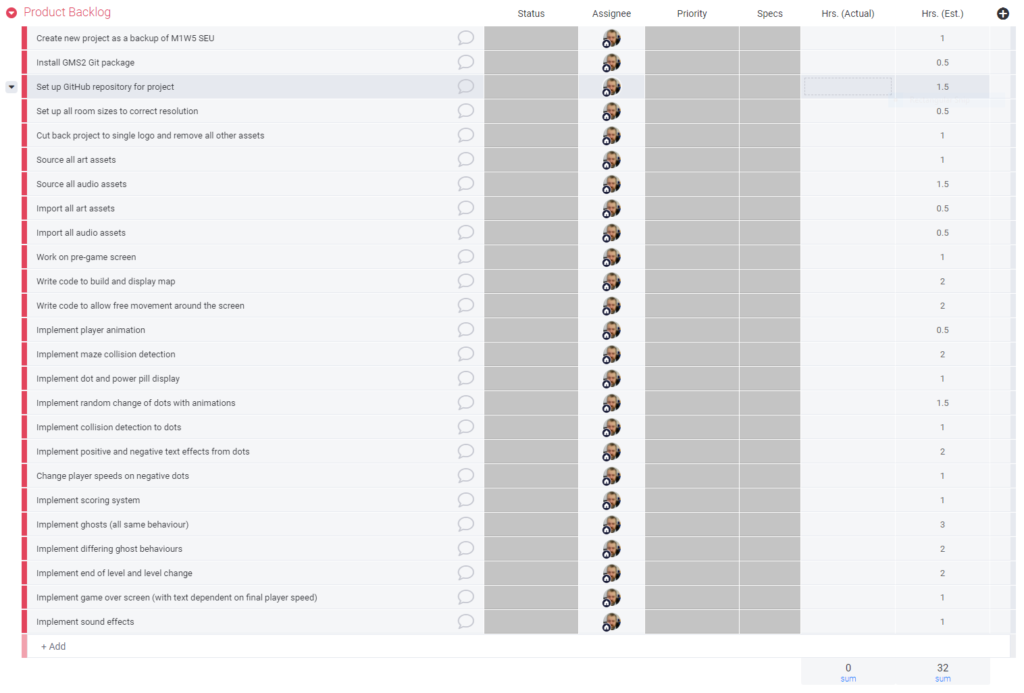
It comes in at an estimated 32 hours, so between now (Saturday 20th March 2021) and Wednesday that leaves 4 days (Saturday to Tuesday inclusive) to ensure I can get it done, or 8 hours per day.
This is going to be tight again.
SMART Goals
With a brief project board in place I believe that this allows me to ensure my SMART goals are covered.
- Specific – I have identified the specifics of what I wish to accomplish.
- Measurable – By listing everything required to produce a completed artefact I know when it will be complete.
- Attainable – Again, with estimated timescales against each item, based on experience, and knowing how long I have before it needs to be complete I can be fairly certain it is attainable.
- Relevant – Here I substitute relevant for realistic, as we already know it’s attainable, so is realistic. What I am really asking here is if the project is relevant to the theme, and I believe it is.
- Time-Bound – I believe this is already covered in the measurable and attainable sections. As this is a short term project, there are no long term goals here.
Setting Up Version Control
As I am using GMS2 again I had a quick Google of how to set up version control and came up with a link to Yoyo Games own website explaining how it can be done. 1
I only really followed this to a a certain point, up to creating a local repository for the project. At that point it seemed like actually I would be as well to try and keep using GitHub Desktop if possible, as that would mean my toolchain for version control remains the same. As it turns out it works fine, so a public repository for the project has been set up here on GitHub.
Pac-Man Research
The very first port of call now was to find out as much as I could about Pac-Man. This included, but was not limited to:
- Finding out what resolution the original game was
- Finding out if I could find the original game graphical assets
- Finding out if I could find the original game audio assets (in a modern format)
- Finding out if there are resources available for Pac-Man game mechanics
Below are a few links I found for some of the items above.
Original assets: http://labs.phaser.io/assets/games/pacman/
Audio assets: https://www.classicgaming.cc/classics/pac-man/sounds
Ghost mechanics: https://dev.to/code2bits/pac-man-patterns–ghost-movement-strategy-pattern-1k1a
After a little research I found out, from multiple sources that Pac-Man ran at a resolution of 224 x 288. That’s really too small for modern displays, so I have decided to run at 896 x 1152, which is 4 times the resolution on each axis.
Project Setup
I took the project that I used for the RI1 session and created a new project based on that, and pushed it to GitHyb.
I then stripped back all the assets and game code to leave myself with a shell to develop within.
And then onto development. But that’s part 3.